Blog Archives
Dumb Problems to Have
Scenario: Fanatical is having another one of their bundle sales. In this specific situation, you want to pick up Backpack Heroes and at least one other game, in order to activate the discount. But which other game? Looking through things, you remember hearing that Laika: Aged Through Blood was an interesting “motorvania”. But wait a minute… do you already have that? Let’s check:
- Steam
- Epic
- GOG
- EA
- Amazon
- Ubisoft Connect
- Xbox Game Pass
Luckily, there are a few aggregators. GOG Galaxy is one, for example. However, for some reason it has got stuck trying to import your Epic games, and thus you can never really trust it. Google searches show you Heroic Games Launcher and Lutris, but after browsing it appears those are Linux-based options intended for the Steam Deck and/or Linux handhelds. Finally, you see Playnite. Will that work?
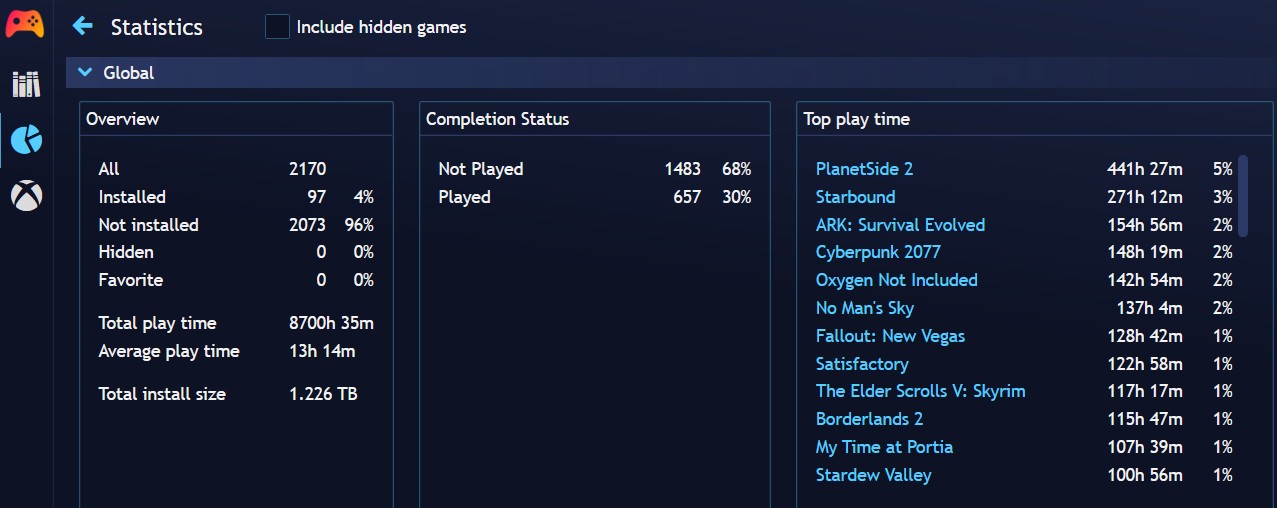
Yes… and no. Out of the box, Playnite will display every Xbox Game Pass game you have ever played before, even if it is no longer on the service. Very annoying. There is an add-on you can install though, to create a separate button to browse the currently available Game Pass games (under Generic: “Game Pass Catalog Browser”). Additionally, there is still some oddness with Steam, insofar as the 449 hours /played of 7 Days to Die is not registering, which kind of calls into question the validity of any of the other stats. But, at least it’s something.
Of course, all of this is an exceedingly dumb/first-world problem to have. A true “I can’t hold all these games” moment. A double-embarrassment of riches, if you will.
I just wish this modern problem would have a modern solution.
 In An Age
Dumb Problems
Oct 23
Posted by Azuriel
I’m going to talk about a dumb blogging problem I experienced recently, so feel free to skip this one.
Like most problems in the world, it started with Tobold. I’ve been a persona non grata in his comment section for years now, but I’ve kept his blog on my Feedly for masochistic reasons. One of his latest posts was so unbelievably asinine though – “Trump isn’t doing any permanent damage!” – that I had had enough. That’s when I realized that I still had him linked over in the Blogroll section of my sidebar, so I figured I should take care of that too.
Big mistake.
Over the years, I have often heard people complain about WordPress, sometimes vehemently enough to drive them to self-host and even try and reinvent the Comment section wheel. While I had misgivings when WordPress changed to the “block” format many years ago, for the most part all the nonsense seemed to just happen to Other People. As it turns out, that’s because WordPress does indeed make inexplicable changes and then hides them in a sort of load-bearing Schrödinger’s box to surprise you with if you ever open it. “Looking to edit your Blogroll? Well, now it’s a Legacy Widget. Also, that widget doesn’t exist anymore! Enjoy the dead cat.”
Now, on the one hand, I can kind of see the logic. The original setup was clunky as fuck: you place a Blogroll widget in your sidebar, and then add entries to the “Link” section of your blog. The new setup is… add a list block to the sidebar with some hyperlinks. Technically, it’s a more elegant solution. Or would be, if they also added information on how to recreate the sort of red bar thing.
Guys, I was raging. It’s bad enough when you have a problem that you find difficult to articulate in a searchable way. But when the problem is caused by someone else laying a goddamn trap in your code… I get it now. The extra dumb thing was how I stumbled onto the solution. After several hours, I was finally giving up and willing to try and grab a JPG of the red bar and manually photo edit some text on it when I ended up right-clicking and Inspecting the bar, e.g. looking at the HTML code directly.
For future reference:
More specifically, you have to add the “Custom HTML” widget to the sidebar and then paste that in. Change the title in the Span section to match your needs, of course. I’m assuming that the H3 (header) design is keyed off of the overall Theme (I’m using Mystique) and color options of the blog.
Anyway, that was a lot more of my yesterday than strictly necessary. Also, the Blogroll itself is looking a bit sparse after trimming Tobold and several bloggers who no longer post. Honestly, I never even liked the static list in the first place – it’s just a poor substitute for the glory that was Blogspot’s dynamic blogroll. You know, the one that allowed you to link to 50+ blogs or whatever and display whichever ones posted most recently at the top? If there was ever a wheel that needed reinventing, it is that one.
Posted in Commentary
5 Comments
Tags: Blogging, Blogroll, Dumb Problems to Have, Schrödinger's Cat, Wordpress